Skip to content
OP Auto Clicker brand mark OP Auto Clicker
Windows Auto Clicker

Automate clicks.Not your workflow.

OP Auto Clicker gives you precise control over click intervals, cursor position and repeat behavior without unnecessary complexity.
Free Portable Lightweight Windows 10 / 11
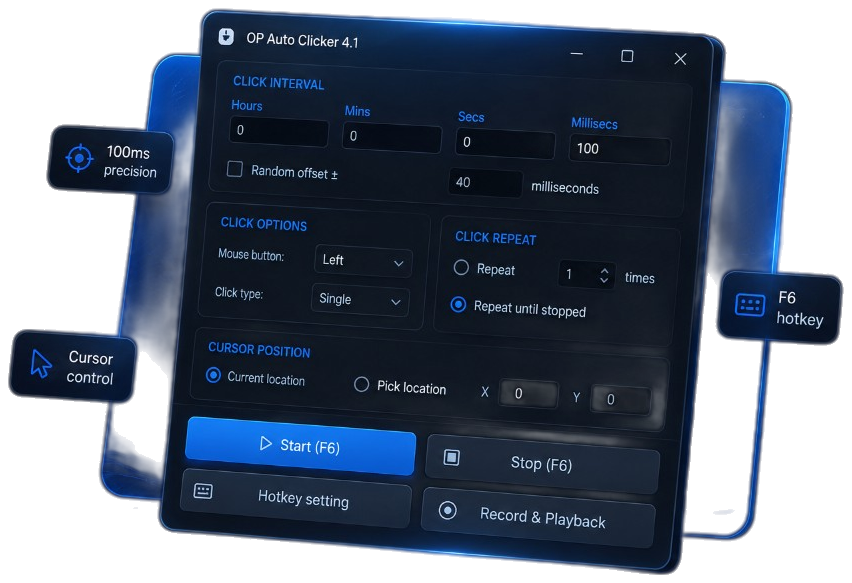
OP Auto Clicker 4.1 Windows application window showing click interval controls and Start F6

Features

Everything you need.
Nothing you don't.

Core controls stay visible so you can configure a click loop without digging through menus.

Custom Click Interval

Set precise hours, minutes, seconds, and milliseconds for every click cycle.

Multiple Click Types

Choose left, right, or middle mouse buttons with single, double, or triple clicks.

Smart Repeat Controls

Repeat a specific number of times or keep clicking until you stop.

Global Hotkeys

Start and stop instantly with F6 or a shortcut you set in Hotkey setting.

Fixed or Current Cursor

Follow the live cursor or lock clicks to a Pick location X/Y point.

Portable & Lightweight

Run the about 1.13 MB EXE without a long installer or heavy setup.

How It Works

Three steps to a running click loop

Configure timing, set the cursor, then start with F6.

Configure click interval

Choose hours, minutes, seconds, and milliseconds. Set button type, click type, and repeat behavior.

Set cursor position

Keep Current location, or use Pick location for a fixed screen coordinate.

Start with hotkey

Press F6 or your custom hotkey and let OP Auto Clicker handle the repetitive clicks.

Interface

Built for precision

A focused Windows utility surface that keeps interval, options, repeat, and position in one place.

Click IntervalHours, minutes, seconds, and milliseconds in one row.
Click TypeLeft, right, or middle with single, double, or triple.
Repeat ModeFinite counts or continuous until stop.
Cursor PositionCurrent location or Pick location X/Y.
HotkeyDefault F6 with Hotkey setting for remaps.

Use Cases

Made for repetitive tasks

Use only where automation is allowed by the app, workplace, or local rules.

Gaming

Automate repetitive mouse actions.

Productivity

Reduce repetitive clicking during workflows.

Testing

Quickly perform repeated interface interactions.

Accessibility

Make repetitive mouse actions easier to perform.

LightweightAbout 1.13 MB EXE
PortableNo installer required
Windows 10 / 11Current desktop builds
FreeCore clicker at $0

Ready to automate repetitive clicks?

Download OP Auto Clicker for Windows and set up a precise click loop in seconds.

Download for Windows

Free · Portable · Windows 10 / 11

FAQ

Questions, answered clearly

Short answers before you grab the EXE.

A portable Windows utility that automates mouse clicks using intervals, click types, repeat settings, hotkeys, and cursor position controls.
Yes. Catalog pages list it as free, and this site does not charge for the Windows 4.1 download button.
Yes. Current builds are used on Windows 10 and Windows 11. Older notes also mention Windows 7 and 8.
For normal use, no. The listed package is a portable EXE: download, open, configure, then press Start or F6.
F6 starts and stops by default. Button labels read Start (F6) and Stop (F6). Remap from Hotkey setting if needed.
Yes. Set hours, minutes, seconds, and milliseconds. Random offset is available when you want slight timing variation.
Yes. Use Pick location for fixed X/Y, or Current location to follow the live cursor.
Download